The extended COVID-19 lockdown is hitting small businesses hard, especially those in the hospitaltiy and tourism industry. Check out Services NSW website for a list of rebates, job programs and regulations on being COVID safe.
If your not sure how to navigate the continuing offerings of Services NSW make sure to reach out to their Concierge Service https://mybusiness.service.nsw.gov.au/concierge.
Creativus highly recommends following Business NSW (formely NSW Chamber of Commerce) who are staying ontop of the latest updates.
Social media is one of the newest ways of connecting that we have. There are so many of them popping up, once upon a time people were saying to be on FB and now it’s Tik Tok.
A good social media strategist knows how to use their time wisely and deal with platforms in a uniform way. Regardless of the latest platform they should be able to understand the way it displays content and who it connects with the most.
Most marketing strategies begin with a few things: content, products… and social media. While using social media isn’t required to grow a business, it can certainly help in most cases. An overwhelming 92% of marketers in 2014 reported that they place high value on social media.
Learn more about productivity at How to Be More Productive on Social Media
Part of being an agency is keeping up to date on the latest changes in marketing. This includes checking and verifying information from a range of sources. SEO round table is one source that we’ve noticed that keeps an accurate pulse on SEO news.
Read more about it here:
Here is a recap of what happened in the search forums today, through the eyes of the Search Engine Roundtable and other search forums on the web. So we got some exciting news, while the Google June 2021 core update finished rolling out on June 12th (it took ten days for it to roll out), the new page experience update just started to roll out slowly on June 15th.
Source: Daily Search Forum Recap: June 16, 2021
It looks like Bing is playing catchup with Google Shopping. On the plus side, it means that Bing is continuously improving its product by listening to its users. Some may ask if Bing is better than Google? In all honesty, it really depends on your target audience, budget, and type of product.
If you have a high enough budget it is always best to compare paid campaigns by different providers. The simplest metric to use is sales, but it’s also a great way to find more information about your target audience.
In the end, a skilled marker will be able to create a persona and analyse the behaviour of website visitors.
Learn more about Bing’s new features by visiting the link below.
A common pain point on online shopping we’ve heard from users is that most searches yield hundreds of results, making it hard for shoppers to decide on a product. With that in mind, we’re excited to announce the latest updates on Bing Shopping , which make product comparison simple so you can quickly find what you’re looking for.
Source: New product comparison features on Bing Shopping
Databases are commonly used by web applications to easily store and retrieve information. Many automated installations and scripts create databases and users for it. Softaculous, for example, is a leading auto-installer that is bundled with cPanel and allows for the easy installation of more than four hundred apps including the most popular CRM WordPress.

For most users, this takes away the pain from manually installing web applications and creating a database. However, there are certain applications that require the creation of a database. Other times a manual installation is preferred or needed over an automated solution.
An example of the need to create a database when automated scrips can’t be executed due to hosting restrictions. This can happen in the case of InfiniteWP the automated installation fails due to not having cron available.
Accessing cPanel
domain.com/cpanel/
Most shared hosting uses the cPanel backend. For those with dedicated hosting, cloud hosting or VPS you may need to reach out to your hosts support.
cPanels theme varies depending on the host. Some hosts like Crazy Domains and Hostgator use white-labelled interfaces that differ from the default theme. However, there is usually a way to manage the database.
The easiest way to access cPanel is to add /cPanel to the end of your domain (e.g. creativus-sites.com/cpanel). It will then redirect you to the port that cPanel is hosted on (usually 2083)
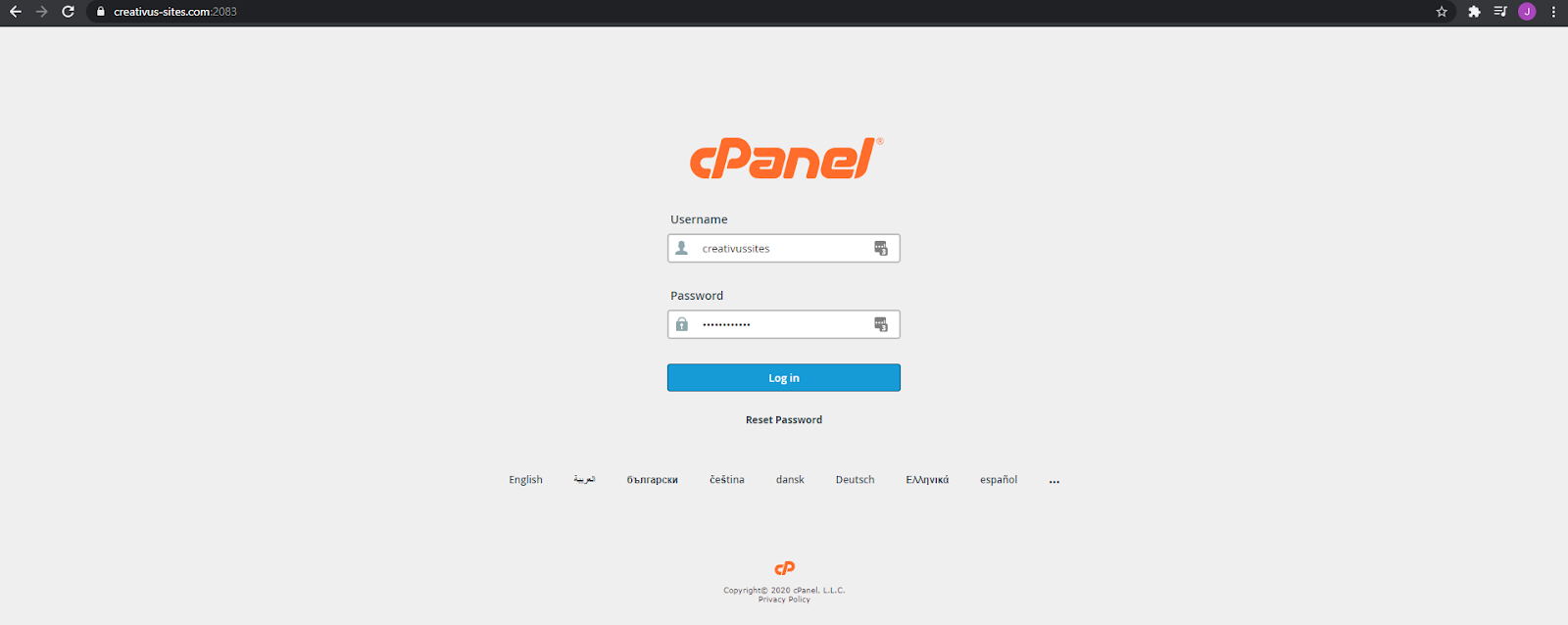
Through your host’s interface
Log into your website host and find the service where your website is hosted on. There should be a one-click login for cPanel or a direct link to SQL databases.
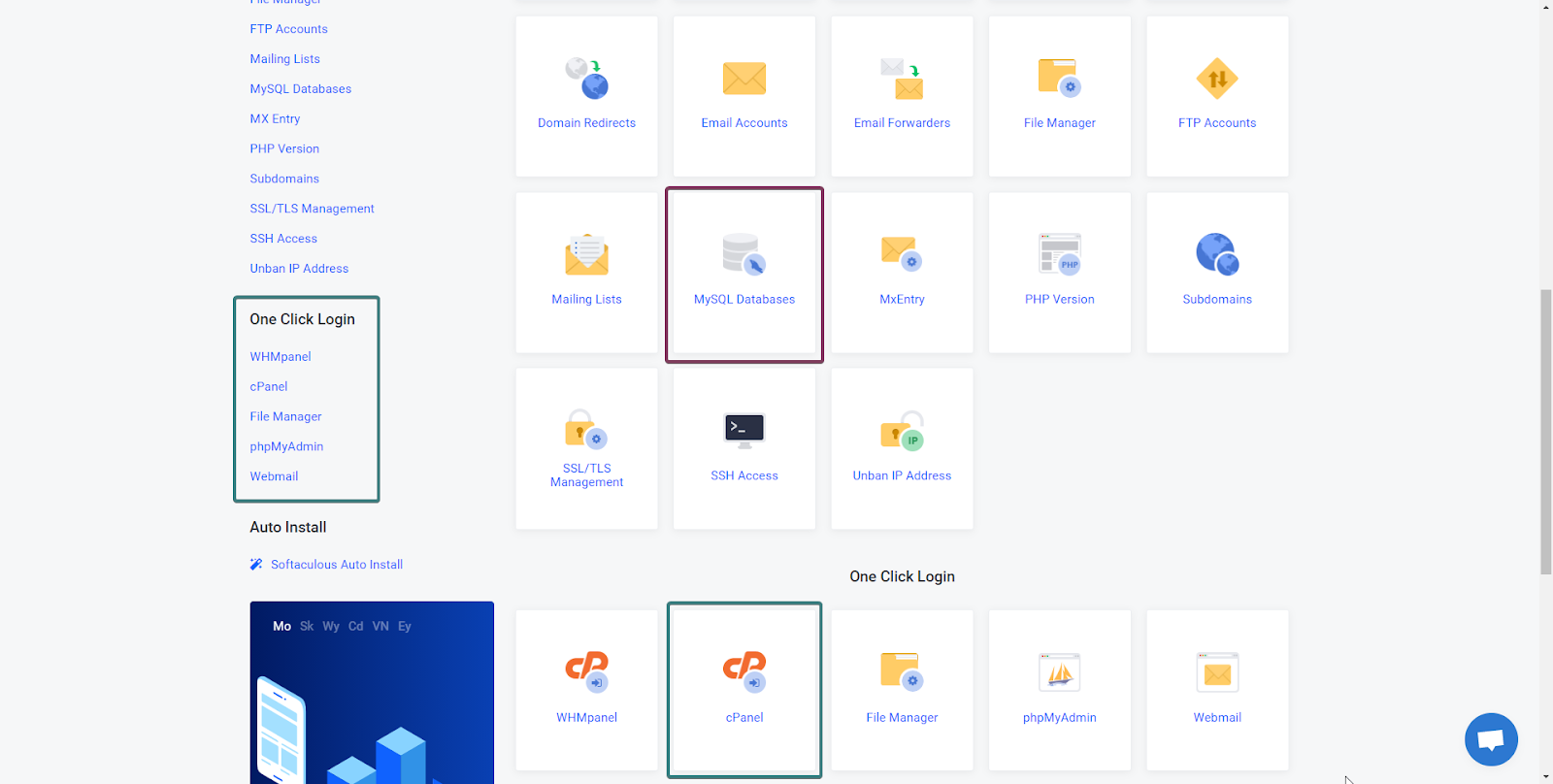
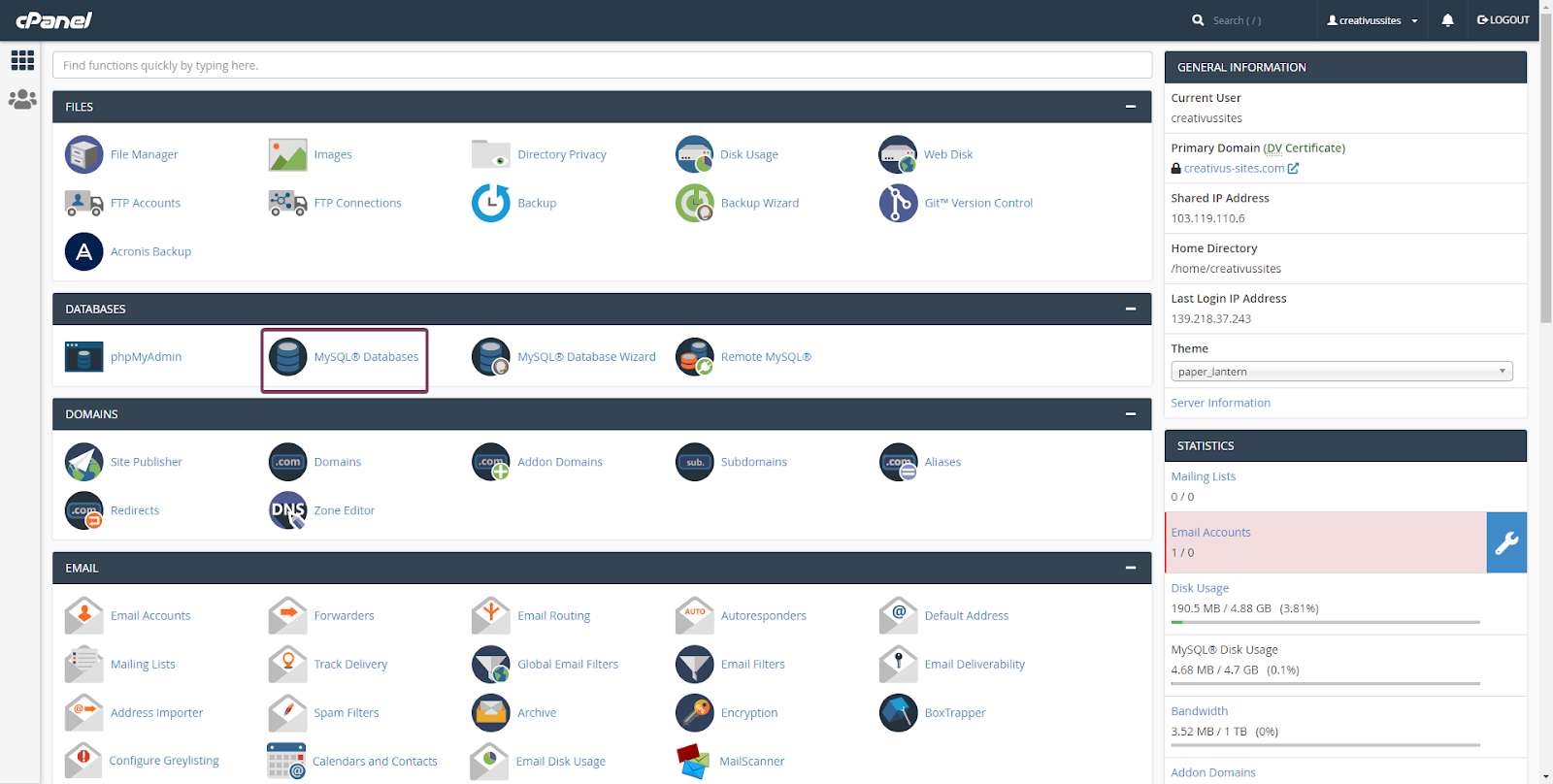
Accessing MYSQL
If you’ve accessed cPanel directly then choose MySQL databases.
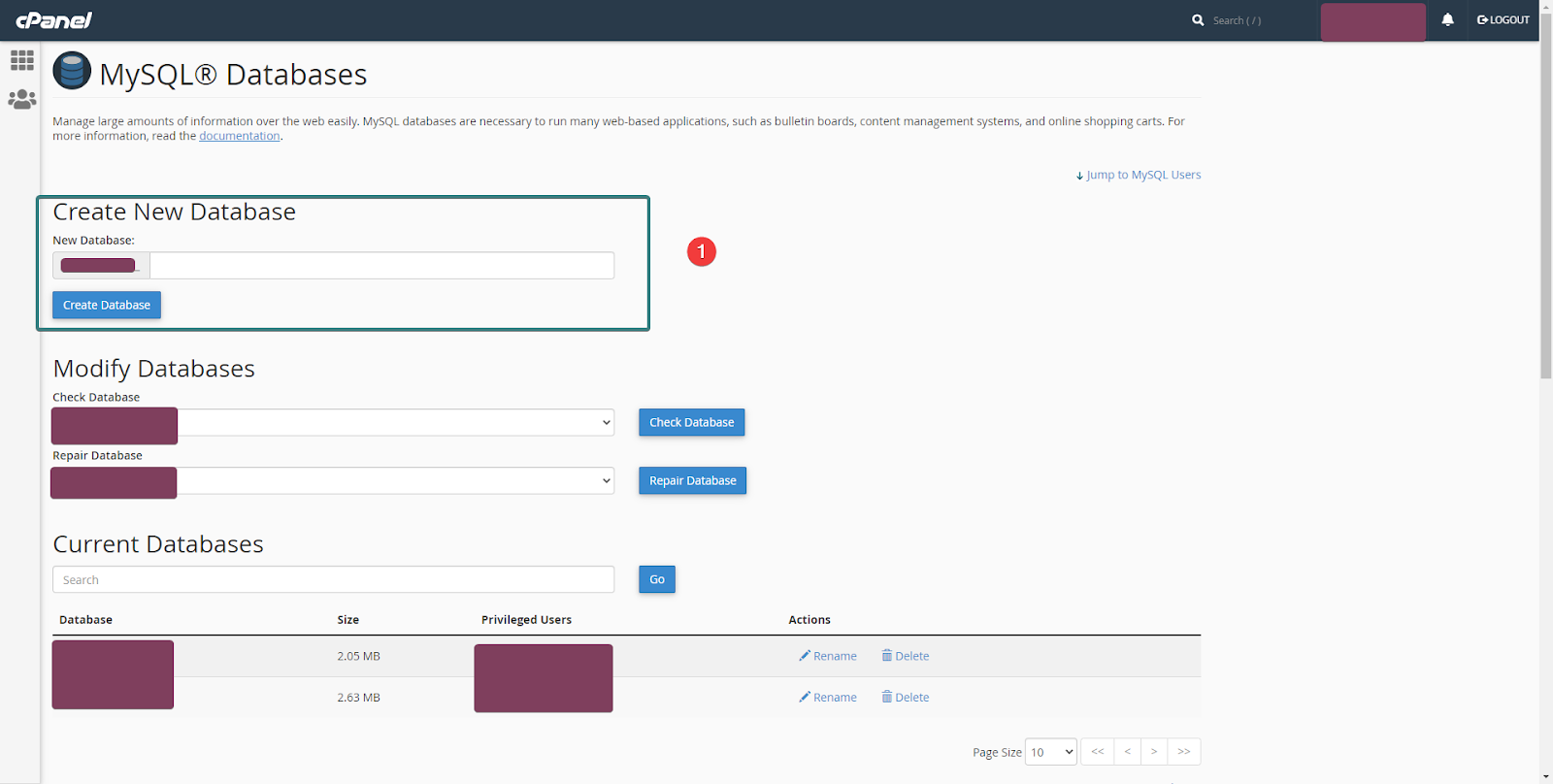
Creating a database
Step 1: Create a name for it.
Creating a database is straightforward. Your cPanel username will automatically be prefixed to the database to avoid any clashes from other databases.
Afterwards, you will need to create and assign a user.
As a safety precaution never share your database name, user or credentials to anyone not authorised to work on your website. Only provide credentials to applications that you trust.
Deleting and renaming a database
Always use caution when deleting or renaming a database. This can easily break your website! Make sure to create a backup of your database before making any changes. The wordpress.org documentation has easy steps on how to backup your database through PHPmyadmin.
To delete a database click delete (2)
To rename a database click rename (3)
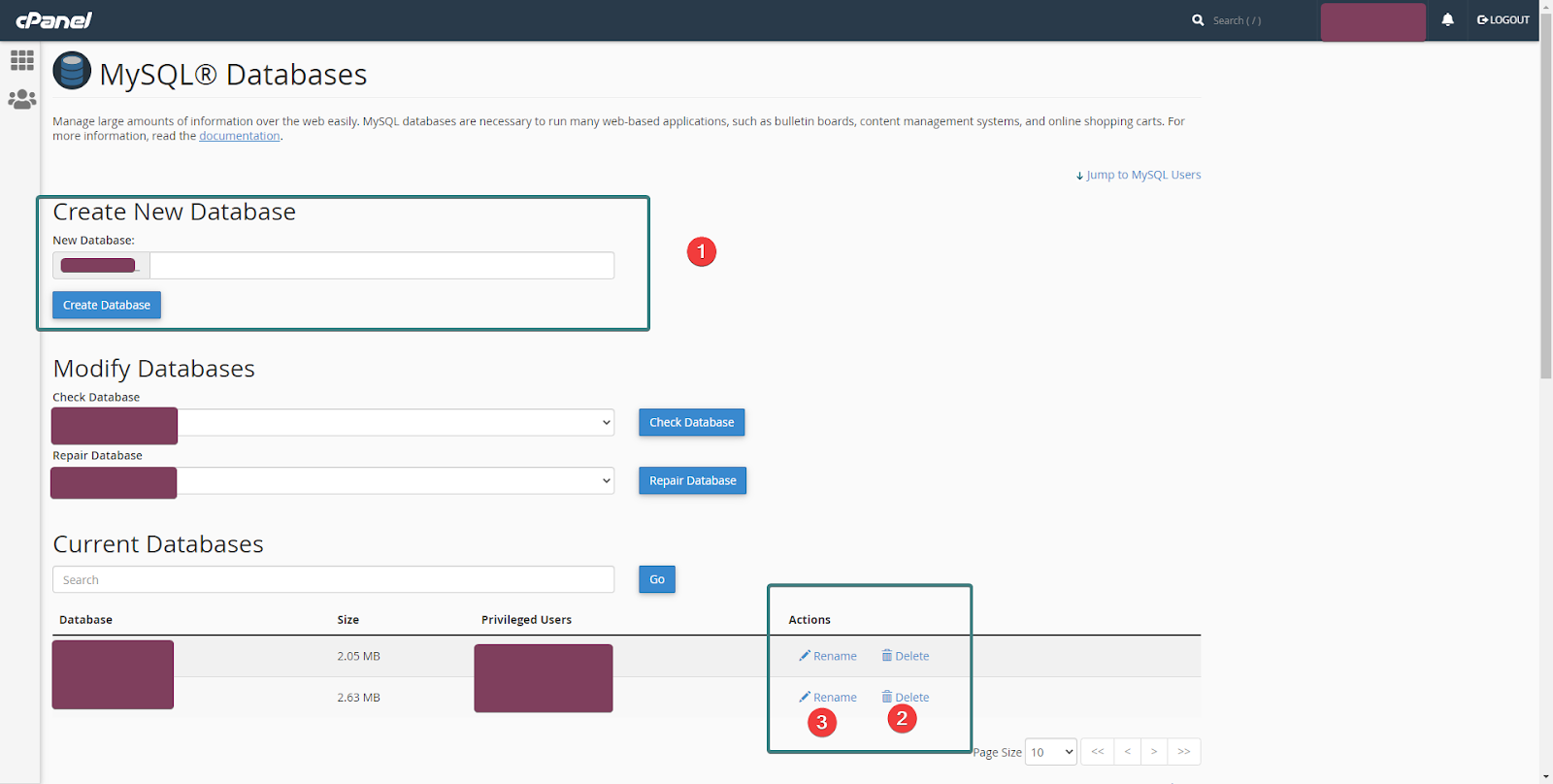
A confirmation dialogue will appear after the action is undertaken.
Managing Users
mySQL users provide access to databases for administrators and web applications. By assigning users per an application the credentials can be revoked if compromised.
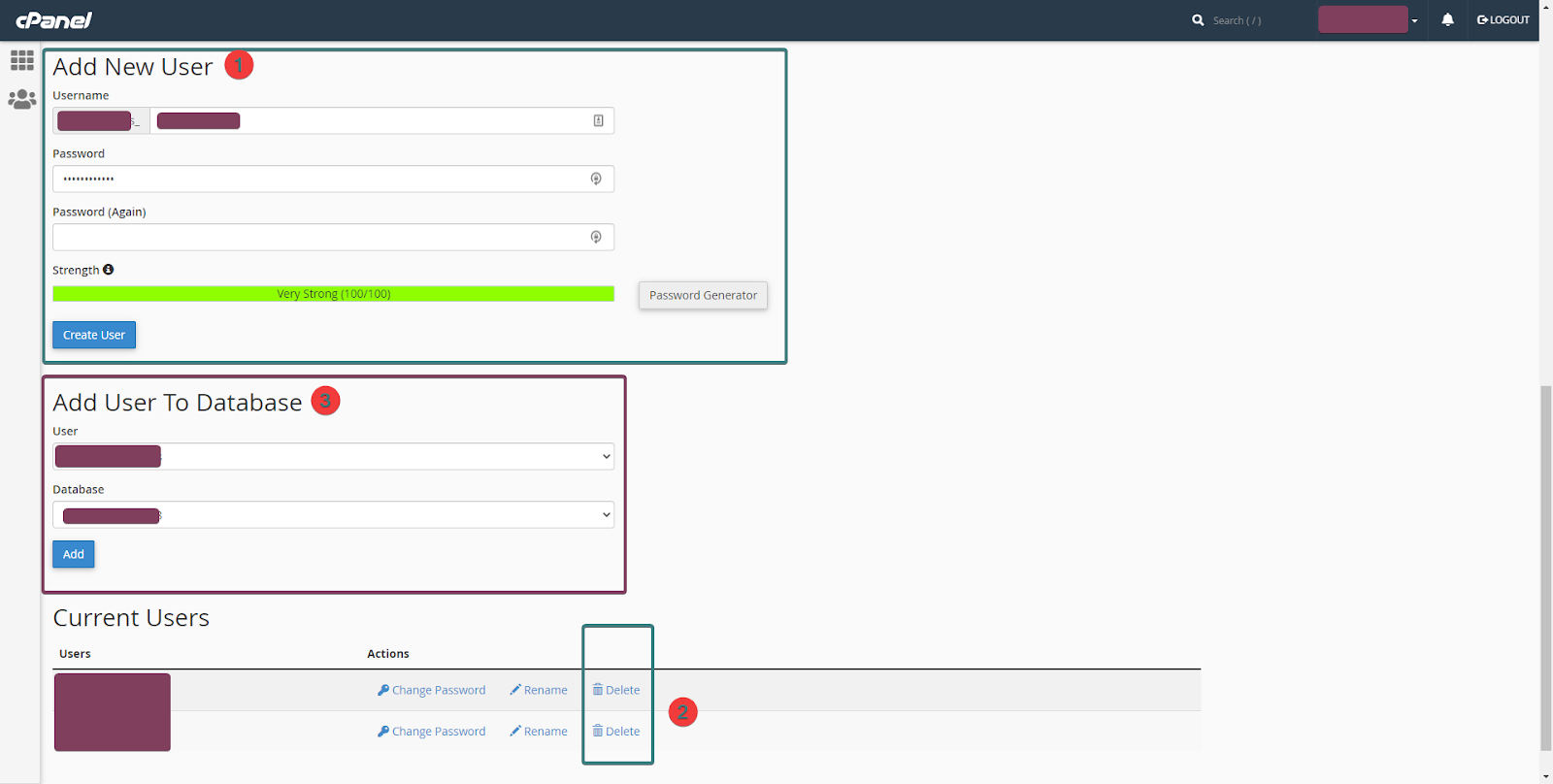
Adding a user
Choose your username and password, like in the case of the database name your cPanel username will be prefixed to the username. A strong password is needed and should be alphanumerical with special characters. See 1 and choose to create a user.
Deleting a user
Make sure that the user isn’t currently being used by an application. Otherwise, this can break your site. On the other hand, if the user has been compromised delete it ASAP! Find the relevant user under current users and click delete (2).
Assigning a user [IMPORTANT]
A database without a user can not interact with your application! A common mistake is assuming that a user with the same name as the database automatically has access. Choose to add a user to the database (3) and make sure it is the right one.
Checking and removing users assigned to databases
The current databases section is where you can check if a user is assigned to a database. Make sure that a user is assigned to a database before utilising it for your own purposes.
It follows a similar logic to the current user’s section and users can be removed from the database by clicking delete.
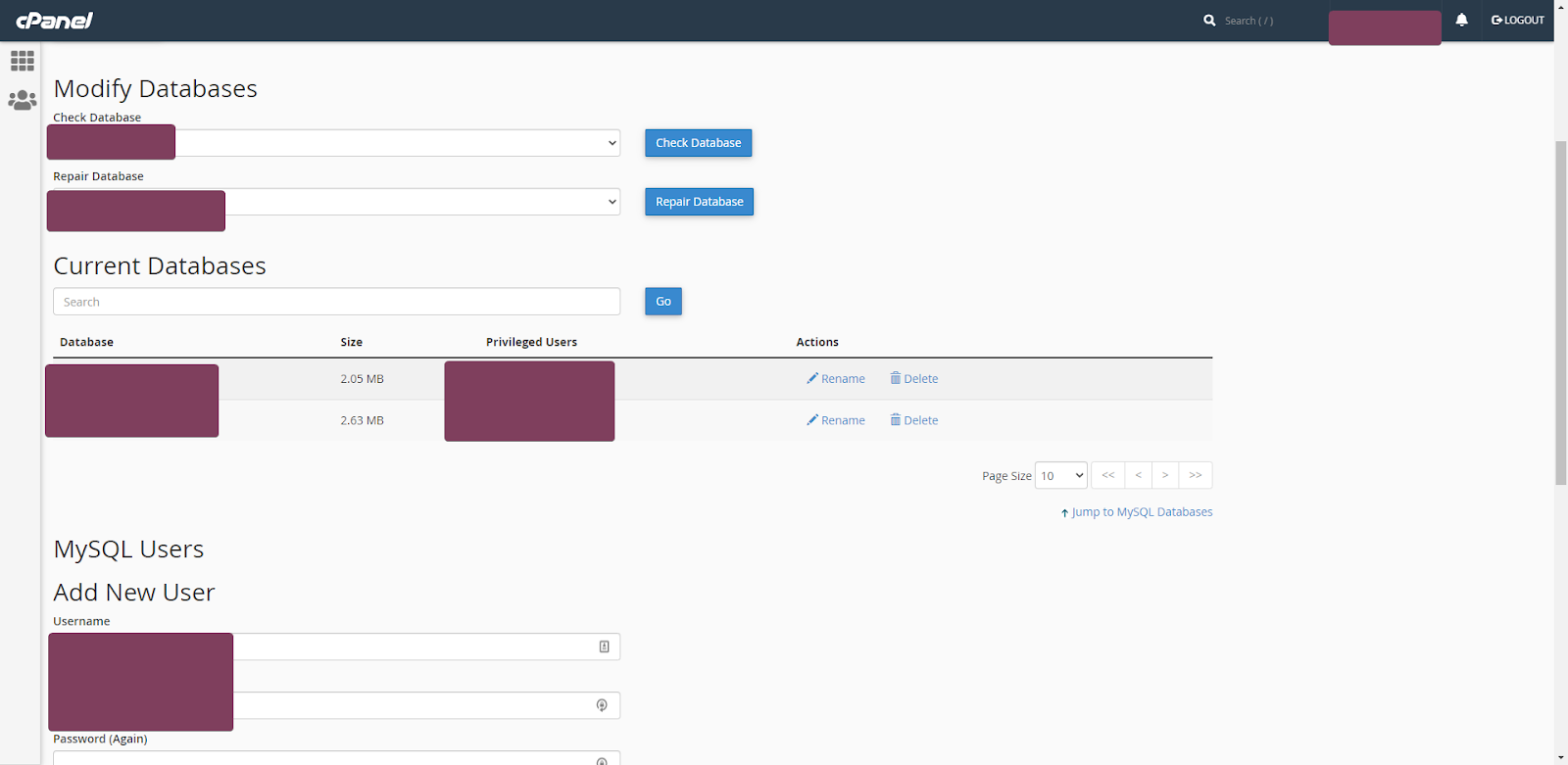
Under the privileged user’s section you can see what users are assigned to what databases. Click the username to find out what privileges the user has been assigned to the database.
Managing privileges
By clicking all privileges all permissions will be granted. This will allow the user to manipulate the database in any way possible and make most applications work out of the box.
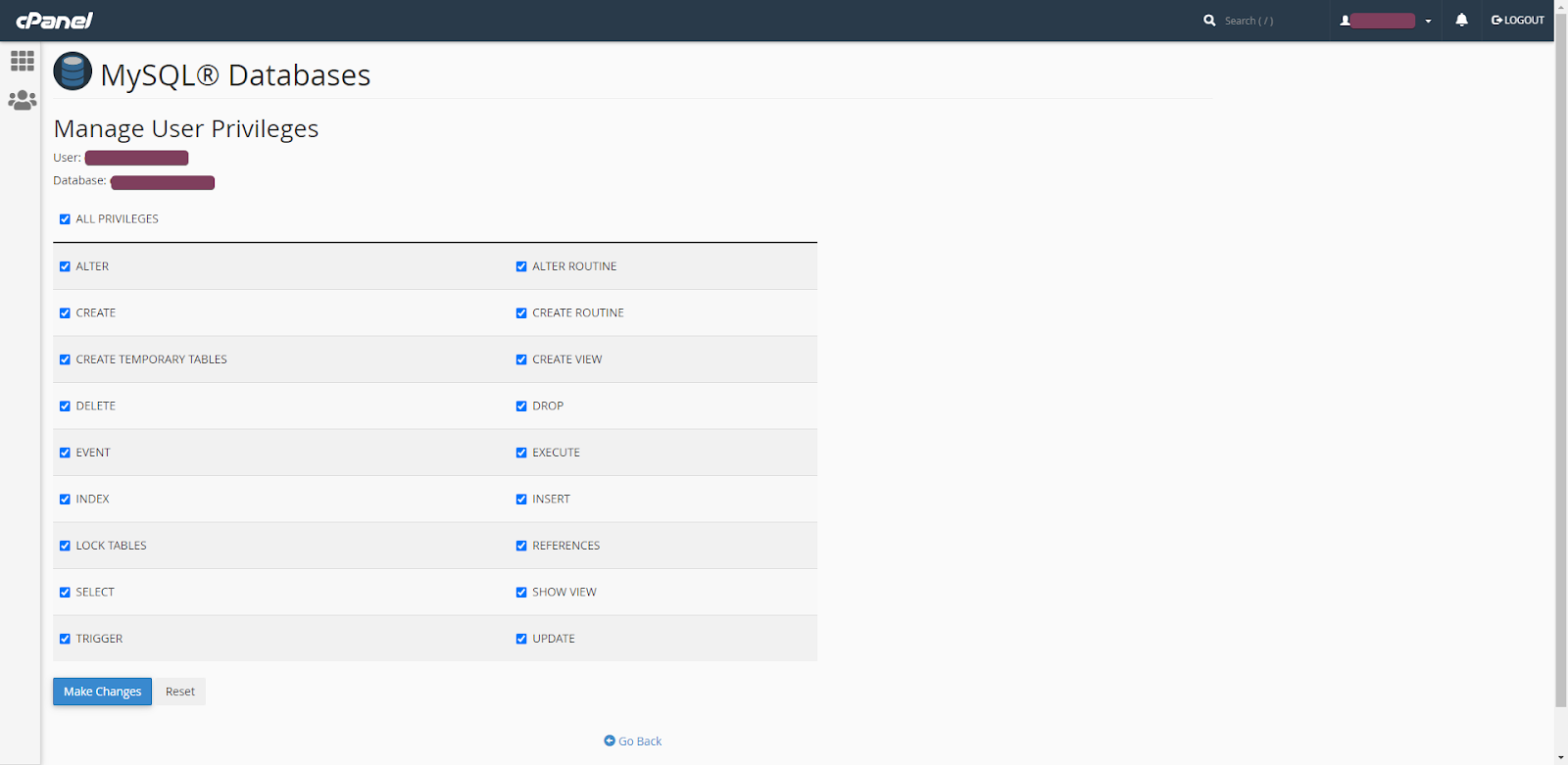
Database security is a whole field in and of itself. There are technical documents from Microsoft that explain the ins and outs of database management but are quite complicated for the average user.
The best approach is to find the minimum privileges required for the application. For example in general, WordPress only needs SELECT, INSERT, UPDATE and DELETE permissions.
However, discretion and testing are always required.
For example, certain plugins need more access. InfiniteWP is an awesome tool that extends WordPress functionality and makes it easy to centrally manage multiple sites. One of its most powerful features is the ability to backup websites in bulk. However, to do so it requires full access. In this case, the benefits of its tools outweigh the risks of granting more access to the database. If you schedule backups, then you’ll always be able to fall back to an earlier version.
A note on InfinteWP
InfiniteWP actually inspired me to write this article. They offer two automated ways of installing their application easily without having to worry about databases. I personally don’t install plugins unless I have to and with the need to manage multiple websites a centralised management solution is essential and definitely worth the install.
Unfortunately, the cPanel installation wouldn’t work out of the box for me and instead of waiting back from my host to enable the cron feature, I decided to through the DIY installation method.
It’s paid version has a plethora of features, the most useful for me is being able to backup website directly to my Gsuite (Google) Drive.
This article is drawn from my own knowledge and experience with no paid sponsorship from any entity. The links to InfiniteWP are affiliate links, only because I think the program is awesome and I hope other admins/businesses owners can also see its value.
Google has prominently promoted it’s reaction to the proposed draft, however Google itself has made an impact on the news industry and reacted to similar situations before.
Googles Appeal to users
Recently (about two days ago), Google has been promoting an alert on Google Chrome, search and other platforms. It claims that the way Australians search on Google is at risk due to new Australian regulation. Part of the drafting process for the legislation also discusses potential compensation for news companies.

The first thing to note is that the regulation known as the News Media Bargaining Code is still being drafted and also applies to Facebook.
As stated in Google’s Press Release by Mel Silver the new legislation only targets the news media niche and not all of Google Search and Youtube.
The press release paints Google as a smaller company as opposed to the ‘big news businesses’ and essentially claims that free services will be put at risk, because of deteriorated search results and possible privacy breaches.
Similar legislation was passed in Spain, Googles first responsive was to advocate to their users directly. Once the legislation passed they simply deranked news organisations and shut down their news channels.
Googles impact on Journalism and News Outlets
Due to the popularity of search engines and specifically Googles own services, the way we consume news is much different than before. Not only is there Google search where users can find specific information, but there is also the Google News section in Search, the Google News app (integrated into most android phones) and AMP sites.
AMP (Accelerated Mobile Pages), is one of the latest innovations by Google that allows publishes to streamline the content to mobiles by keeping a consistent web design and allowing loading time to be faster by utilizing caching and user first designs. Technically the AMP project is open source, however it has only been popularised due to Google’s influence. It is notoruly difficult to implement yet Google Search Console (a way for webmasters to find out about how Google indexes its sites) will bring up errors to push publishers to use it.
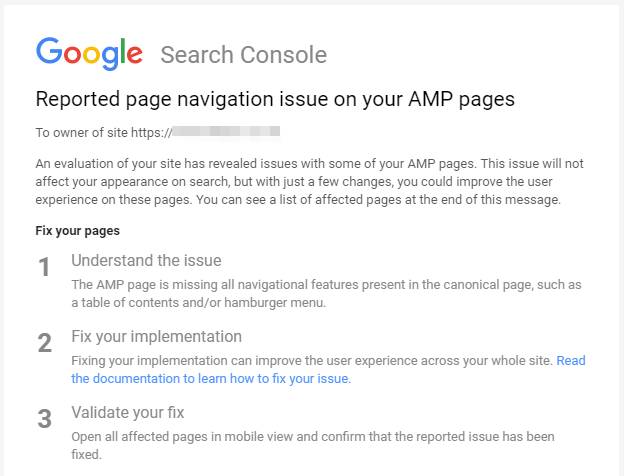
Technically it’s great for the consumer since the end experience is more streamlined access with more content.
However, there are vocal objections to it especially from publishers who are struggling to monetize their content. Print media has already been taking a drastic hit, which influences the quality of journalism. Due to COVID News Corp recently announced the suspension of over 60 community newspapers. Putting aside issues that Australia has a high media concentration (practically dominated by News Corp and Fairfax), the impact of the loss of local newspaper will be felt severely by remote communities who may feel like they’ve lost their voice.
How will this impact SEO?
At the moment, these proposed changes will only impact News Outlets. There are provisions in the legislation stating that Google will need to give 28 days notice before any algorithm changes. However, they don’t need to disclose what the changes are. Google is claiming that News Outlets will have a greater competitive advantage, but the algorithm changes will most likely only impact that Niche.
Australians publishers and news outlets should be keeping a keen eye on the latest developments and any changes to the News Bargaining Legislation. Hopefully, the Australian Government has learned from what happened in Spain and news will continue to be accessible.
For those outside the publishing niche, it is still up in the air on how these changes will affect everyone else. However, its a good case study on how Google reacts to changes in the legal environment.