Learn to Boost Your Business Today with Digital Marketing Skills
📚 Learn to boost your business today with digital marketing skills. In today’s digital landscape, mastering digital marketing can significantly elevate your business’s reach and impact. It’s a skill that can be learned, much like any other aspect of running a business. While professionals bring specialized knowledge and experience, many digital marketing tools and platforms are accessible for business owners to try themselves.
Accessible Resources for Learning Digital Marketing
Free Courses to Kickstart Your Journey
- Google Digital Garage – Fundamentals of Digital Marketing
Duration: Approximately 40 hours
Description: Covers various aspects of digital marketing, including SEO, social media, and email marketing. Participants receive a certificate upon completion.
Access: Google Digital Garage - HubSpot Academy – Digital Marketing Certification
Duration: Around 5 hours
Description: Provides a broad overview of digital marketing topics such as content marketing, SEO, and social media strategies. A certification is awarded upon completion.
Access: HubSpot Academy - Google Skillshop
Duration: Self-paced
Description: Offers free courses on topics like pay-per-click (PPC), data analytics, email marketing, and conversion rate optimization (CRO).
Access: Google Skillshop
Paid Courses for Advanced Learning
- Coursera – Digital Marketing Specializations
Duration: Courses range from 1 to 3 months
Description: Offers various specializations in digital marketing, covering topics like brand management, marketing strategies, and analytics. Courses are designed by institutions like the University of Illinois and the Digital Marketing Institute.
Access: Coursera Digital Marketing Courses - Google Digital Marketing & E-commerce Certificate
Duration: Designed to be completed in under six months with less than 10 hours of study per week
Description: Teaches the fundamentals of digital marketing and e-commerce, including strategies for engaging customers online and using tools like Canva, Hootsuite, and Google Analytics.
Access: Google Digital Marketing & E-commerce Certificate - Udemy – Various Digital Marketing Courses
Duration: Varies by course
Description: Offers a wide range of digital marketing courses, both short-term and long-term, covering topics like SEO, social media marketing, and content creation.
Access: Udemy Digital Marketing Courses
Embracing Digital Marketing as a Business Skill
Digital marketing encompasses various strategies—from SEO and social media marketing to paid advertising and content creation. These tools are crucial for reaching your audience effectively in the digital age. Learning these skills empowers you to navigate and understand your online presence better.
DIY vs. Professional Expertise
Just as many homeowners tackle minor repairs before calling a professional, business owners can experiment with digital marketing themselves. Trying DIY efforts can provide insights into what works for your business. It’s about learning and refining strategies, understanding your audience, and building your brand’s digital footprint.
When to Seek Professional Support
While DIY efforts can be rewarding, there comes a point where investing in professional expertise pays off. Digital marketing agencies like Creativus Design bring years of experience, industry insights, and proven strategies to the table. They can help navigate complex challenges, scale your efforts, and ensure your marketing investments yield optimal results.
Conclusion: Empower Your Business with Digital Marketing
Digital marketing is not just a task—it’s a skill that can transform your business’s online presence. Whether you’re starting from scratch or looking to enhance existing efforts, embracing digital marketing empowers you to connect with your audience effectively. Remember, it’s okay to experiment and learn along the way. And when you’re ready to take your digital strategy to the next level, Creativus Design is here to support you.
Begin your journey today and unlock the potential of digital marketing for your business. Let’s grow together!
After a long hiatus, it’s time to revisit your online presence and ensure that customers can find you. Search Engine Optimization (SEO) is more than just a buzzword—it’s the key to visibility, credibility, and ultimately, more business.
In this primer, we’ll cover the basics of SEO, starting with understanding how keywords influence your search rankings. We’ll show you how to track and manage your keywords effectively, use simple tools like Google Search Console, and take advantage of search operators like site:yourdomain.com to see how your content is performing.
Remember: SEO is an ongoing effort, not a one-time fix. By owning your keywords and maintaining consistent, high-quality content, you’ll improve your visibility, attract the right audience, and keep your business growing. Let’s get Back to Business—because being found online shouldn’t be a shot in the dark.
Introduction to Webalizer
To access Webalizer, you will need backend access (which can be granted by emailing support@creativus-design.com) if your hosting is with us.

Step 1: Login to the Backend
Note: You are entering the danger zone. Do not use any other features unless you are confident in their function. Changes to settings can break your site and are not covered under web maintenance. Please consult Creativus Design before making changes you are unsure about.
- Visit yourdomain.com:2222 (replace yourdomain.com with your actual domain. Add ‘:’ after your domain name and then the numbers 2222)
- The DirectAdmin – Web Control Panel login screen will appear.
- Enter the username and password provided by support.

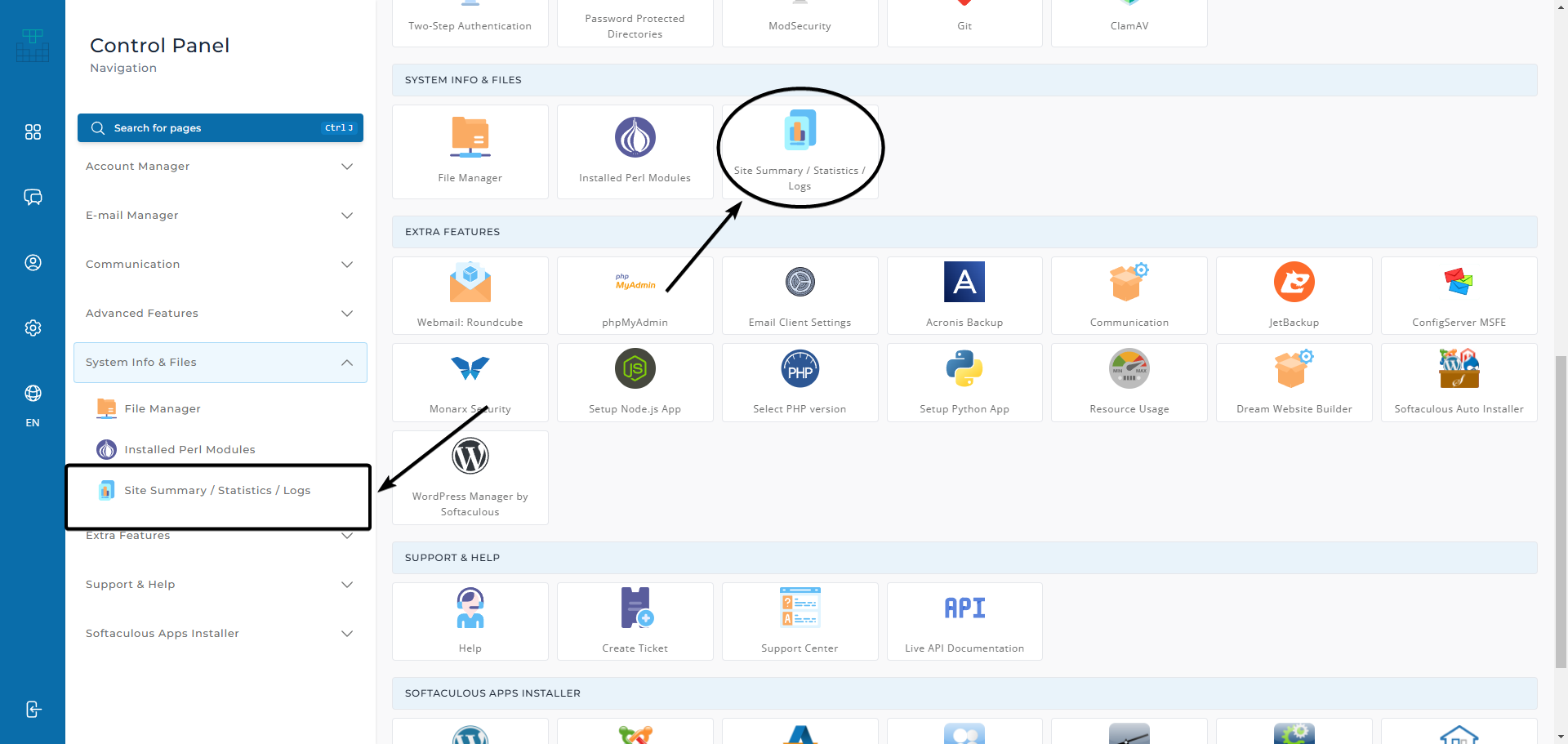
Step 2: Locate Site Summary / Statistics / Logs
There are two ways to access site statistics:
- Using the sidebar menu
- Browsing through the icon menu
The Site Statistics option is available under the System Info & Files header.
Step 3: Select Your Domain
Choose your domain under Domain Statistics.
Step 4: Click on the Month
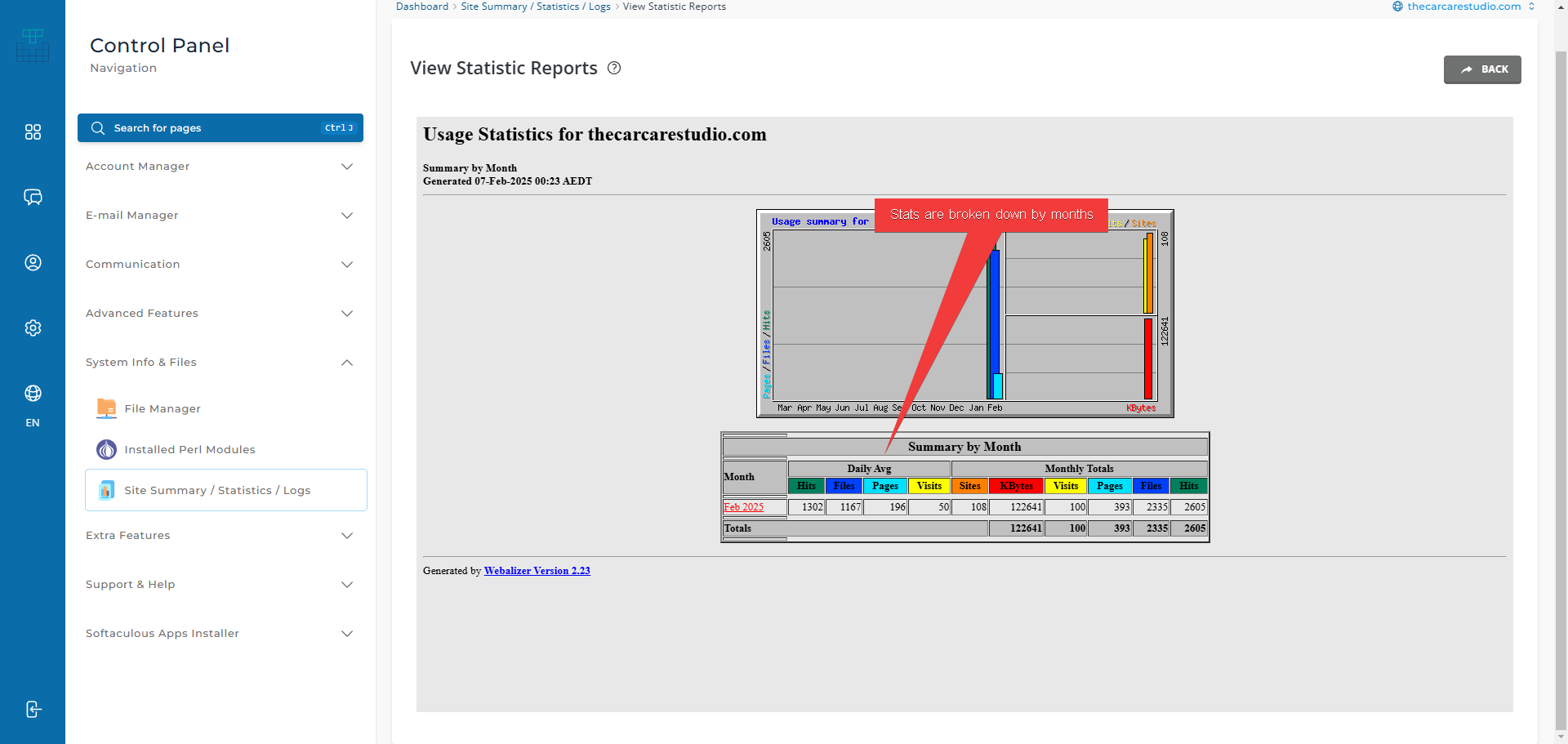
The report will show an overview of stats for the selected period. Click on a specific month for more detailed information.
Statistic Definitions
Webalizer statistics are designed for system administrators and can be quite technical. However, these key statistics are useful for business owners:
Hits
A hit is any request made to the server. This includes HTML pages, images, scripts, and files. Every request logged by the server is counted as a hit, meaning this number will always be very high.
Visits
A visit is counted when a request comes from a unique IP address and is not within the visit timeout window of a previous request. Unlike hits, visits represent actual users accessing the site, but they still include bots and non-human traffic.
View the full Webalizer glossary here.
Webalizer’s Accuracy
Ironically, Webalizer is too accurate. It logs every request, including those from bots and scripts, making its numbers much higher than reality. If you’re unfamiliar with websites, the number of bots crawling your site can be surprising.
Keep in mind, these statistics include not just human visitors, but also hundreds of legitimate bots such as search engines and AI crawlers. Learn more about prominent web crawlers here.
Marketing Web Analytics Services
Since Webalizer provides extensive server log data, an alternative software exists to extract meaningful statistics from real website visitors. These tools are called web analytics software, and the most widely used one is Google Analytics.

Web Analytics Metrics, Webmaster Tools, and Meaningful Insights
Google Analytics provides insights into actual user behavior, such as session duration, bounce rates, and goal conversions. Additionally, Google Search Console helps with search performance and site indexing.
Different Metrics
| Webalizer Term | Google Analytics Equivalent | Explanation |
|---|---|---|
| Hits | Event Count (All Events) | Webalizer counts all file requests, including scripts and images. GA tracks meaningful interactions. |
| Pages | Pageviews | GA only counts actual page loads, making it more reliable for business insights. |
| Visits | Sessions | Webalizer may count multiple visits from the same user incorrectly. GA4 uses session-based tracking. |
Setting Up Analytics
Setting up Google Analytics or other tools requires adding tracking code to your website. Unlike Webalizer, which starts tracking immediately from the server, analytics tools only collect data from the point of installation.
Wrap Up
One of the benefits of Webalizer is that it tracks your website from day one. Analytics tools like Google Analytics need to be installed before they start collecting data.
Need help with web analytics setup? Contact us at support@creativus-design.com.
How Creativus Design Simplifies Business Domain and Hosting Management
Managing a business’s domain and hosting can often feel overwhelming, especially when you’re busy focusing on growing your company. At Creativus Design, we aim to take the hassle out of this process with our comprehensive website maintenance plans. These plans not only keep your website secure and up-to-date but also handle end-to-end management of domain and hosting information—so you can focus on what you do best.
Hassle-Free Management with Our Website Maintenance Plans
When you sign up for one of our website maintenance plans, you gain access to a service designed to make managing your website effortless. We handle everything from storing domain and hosting credentials to ensuring your site stays live, secure, and current. You can learn more about our maintenance plans and what they include here.
However, while we take care of the technicalities, we strongly believe in empowering our clients to maintain control over their digital assets. Your website, domain, and data belong to you, and we’re here to support your ownership.
Empowering Clients with Control and Flexibility
We offer flexible solutions that allow you to choose the setup that works best for you. Whether you prefer us to host your website and manage your domain or to use your own hosting and domain provider, we’re here to help.
We typically use DirectAdmin as our hosting panel, which provides clients with the tools to access and manage their website. If you prefer, you can request DirectAdmin access and even download an initial backup of your site. This ensures you always have a copy of your files and database for added peace of mind.
Backups and Security with DirectAdmin
Dynamic websites often consist of two key components: the files and the database. Through DirectAdmin, our hosting plans include Acronis Backup, a reliable tool that allows you to back up both your files and database easily.
We strongly encourage clients to create an initial backup when their website is launched, as this serves as the ‘original’ copy of the website before any modifications. This is especially useful if you make changes to the website later and need to restore it to its original state.
Additionally, having a local backup provides full ownership of your website’s code, which you can use to transfer providers or experiment independently. This extra layer of security ensures that your website’s data remains protected. You can find detailed instructions on how to use Acronis Backup here.
Domain Management Done Right
For domain management, we partner with Synergy Wholesale, a trusted provider in the industry. All domains are registered under the client’s name, ensuring you retain full ownership. Upon registration, you’ll receive an email confirmation of your ownership.
When it comes time to renew your domain, you’ll receive an automated reminder. From there, you can choose to renew through us or take other actions, like transferring or canceling the domain. Should you ever lose access to your domain, Synergy Wholesale offers a Domain Recovery Tool as a backup method to regain control independently of us. This ensures that you retain full ownership of your domain and can always access it without relying solely on our support. Learn more about this feature here.
Why Backup Is Important
We always recommend that clients create and store an initial backup of their site. Backups are essential for ensuring that your website can be quickly restored in the event of an issue. With Acronis Backup available through DirectAdmin, you can safeguard your files and database with ease.
At Creativus Design, we strive to simplify the complexities of domain and hosting management while giving you the control and flexibility you deserve. Whether you’re a hands-off client who wants everything managed or someone who prefers more involvement, our tailored solutions are designed to fit your needs.
Ready to streamline your domain and hosting management? Reach out to us today to discuss your options!
At Creativus Design, delivering tailored digital solutions to empower small and medium-sized businesses has been at the heart of the company’s mission. Recently, the founder, Jeffrey Fazal, shared insights about the company’s journey, values, and approach in an exclusive interview with Website Planet.
The interview sheds light on Creativus Design’s commitment to simplifying the complexities of website development and digital marketing, ensuring that every client receives solutions customised to their unique needs.
Key Highlights from the Interview:
- Personalised Approach: Unlike many agencies that rely on standardised packages, Creativus Design focuses on creating tailored solutions that consider each client’s budget and business goals.
- Comprehensive Services: From website development to business coaching, branding, and digital marketing strategies, the company goes beyond delivering websites to provide holistic business solutions.
- Staying Ahead with Technology: Leveraging advancements such as AI tools and adopting a stack-agnostic approach, Creativus Design ensures its solutions are innovative and future-proof.
- Client-Centric Process: The company prides itself on understanding its clients’ challenges and simplifying digital strategies to achieve practical, tangible outcomes.
The Creativus Difference
One aspect that sets Creativus Design apart is its ability to think beyond the conventional role of a website. As discussed in the interview, the team approaches websites as tools to enhance business operations, from integrating backend portals for employees to incorporating features like careers pages. This holistic perspective ensures clients receive more than just an online presence—they gain a valuable business asset.
Creativus Design’s adaptability and commitment to staying current with industry shifts are at the core of its success. By focusing on transparency and collaboration, the company continues to deliver impactful solutions that help its clients grow and thrive.
To learn more about the journey and philosophy of Creativus Design, read the full interview with Website Planet.
Mastering Search Engine Optimization (SEO): A Comprehensive Guide
In today’s digital age, having a strong online presence is paramount for any business looking to thrive. Perhaps you’ve heard about SEO but are not entirely sure what it entails or how it can benefit your business. In this blog post, we are going to delve deep into the world of Search Engine Optimization, providing you with a detailed understanding that will set the stage perfectly for implementing advanced SEO strategies.
What is Search Engine Optimization?
Search Engine Optimization, commonly referred to as SEO, involves the practice of optimizing your website to enhance its visibility for relevant searches. The better visibility your pages have in search results, the more likely you are to attract attention and draw prospective and existing customers to your business.
Importance of SEO
1. Increased Web Traffic
When your website ranks higher on search engines like Google, you’re more likely to have increased web traffic. The top five results on Google receive nearly 68% of all clicks, making it essential to strive for high-ranking positions.
2. Builds Credibility and Trust
Websites that appear higher in search engine results pages (SERPs) are generally perceived as more credible. They are trusted because search engines like Google have deemed them relevant and authoritative.
3. Better User Experience
SEO isn’t solely about search engines but also about improving user experience. Factors such as mobile-friendliness, page load speed, and easy navigation all contribute to better overall user experience, which in turn benefits your SEO efforts.
4. Cost-Effective Marketing
Compared to traditional advertising methods, SEO is incredibly cost-effective. While it may take time to see the results, once your website begins to rank highly, the cost of maintaining high rankings is minimal compared to the gains.
Core Components of SEO
1. Keywords and Key Phrases
Keywords are the terms and phrases that potential customers type into search engines when looking for products, services, or information. Identifying and using the right keywords is fundamental for optimization. Tools like Google’s Keyword Planner, Ahrefs, and SEMrush are valuable for this task.
Key Statistics:
| Tool | Key Features |
|---|---|
| Google Keyword Planner | Free, Keyword Research |
| Ahrefs | Paid, Comprehensive SEO Suite |
| SEMrush | Paid, Digital Marketing Toolkit |
2. On-Page SEO
On-Page SEO involves optimizing each individual page on your website to rank higher and earn more relevant traffic. This includes efforts to improve the content, HTML source code, and images on your webpage.
Key Elements of On-Page SEO:
- Title Tags: The title tag of your page is one of the first things search engines look at. Incorporate keywords naturally.
- Header Tags (H1, H2, H3): Use them to structure your content. These tags help search engines understand the context of your content. For instance, an H1 tag for the main title, H2 for subheadings, and so forth.
- Meta Descriptions: Although not a direct ranking factor, a well-crafted meta description can improve click-through rates. A compelling meta description includes the primary keyword and a brief but enticing summary of the page’s content.
- Alt Text for Images: Search engines can’t “see” images, so they rely on descriptive alt text. Including keywords in your alt text, where appropriate, can also help with your SEO.
- Internal Links: Linking to other content on your site can help search engines understand your site’s structure. By building these linkages, you increase the ability for visitors to discover more relevant content on your website.
3. Off-Page SEO
Off-Page SEO refers to actions taken outside your website to impact your rankings within SERPs. Building high-quality backlinks from reputable websites is a critical element of off-page optimization.
Key Techniques for Off-Page SEO:
- Backlinking: Acquiring backlinks from authoritative websites boosts your site’s credibility. Use strategies such as creating shareable infographics, writing guest posts, or conducting original research that others will cite.
- Social Signals: Sharing your content on social media platforms can increase visibility and traffic. Engage actively on platforms like Twitter, LinkedIn, and Instagram to promote your content.
- Guest Blogging: Writing blogs on other reputable websites can help you get backlinks, driving more traffic to your site. Make sure to choose websites within your niche to ensure relevance and authority.
4. Technical SEO
Technical SEO focuses on improving your website’s backend structure and foundation. Effective technical SEO helps search engines crawl and index your site more efficiently.
Key Aspects of Technical SEO:
- Site Speed: Faster-loading websites perform better in rankings. Use tools such as Google PageSpeed Insights to identify and fix issues slowing down your site.
- Mobile-Friendliness: With more searches occurring on mobile devices, Google uses mobile-first indexing. Ensure your site is fully responsive, offering seamless navigation on mobile devices.
- XML Sitemaps: Helping search engines understand your site’s structure can aid in better indexing. Generate and submit an XML sitemap to help search engines more effectively discover new content on your site.
- Robots.txt: This file gives instructions about your website to search engine bots. Properly configure your robots.txt file to ensure the pages you want to be indexed are accessible to search engine crawlers.
SEO Best Practices
1. Quality Content is King
High-quality, relevant content is critical. Your goal should be to create valuable content that meets the needs of your audience. The better your content, the longer visitors will stay on your site, which in turn boosts your rankings.
2. Regularly Update Content
Search engines favor fresh content. Regularly updating your website with new posts, products, or services can help maintain and improve your rankings. Content updates signal to search engines that your website is current and relevant.
3. Use Analytics Tools
Using tools like Google Analytics, Google Search Console, and other SEO auditing tools can help you track the performance of your SEO strategies. These tools provide insights into traffic sources, user behavior, and keyword performance.
4. Optimize for Local SEO
If you have a local business, optimizing your website for local SEO can be highly beneficial. This includes optimizing your Google My Business listing, acquiring local citations, and encouraging customer reviews.
Steps to Optimize for Local SEO:
- Google My Business: Claim and optimize your listing. Ensure all information is accurate and consistent.
- Local Keywords: Incorporate local keywords naturally throughout your content. Use tools like Moz’s Keyword Explorer to find geo-specific keywords.
- Reviews: Encourage satisfied customers to leave positive reviews on your Google My Business profile and other review sites. Respond to reviews to engage with your audience.
- Local Citations: Ensure your business’s name, address, and phone number (NAP) are consistent across all online directories and platforms.
Practical Application of SEO Strategies
To get started on implementing SEO on your own site, follow these step-by-step instructions:
Conducting a Website Audit:
- Technical Audit: Use tools like Screaming Frog or Ahrefs to crawl your site and identify technical issues.
- Content Audit: Evaluate the quality and relevance of your content. Use SEO tools to analyze keyword usage and identify opportunities for improvement.
- Backlink Audit: Use tools like Ahrefs or SEMrush to evaluate your backlink profile. Identify toxic backlinks that may harm your SEO and disavow them.
Keyword Research:
- Brainstorm Keywords: Come up with a list of potential keywords your audience might use to find your content.
- Use Keyword Tools: Utilize tools like Google Keyword Planner and Ahrefs to expand your list and find keyword variations.
- Analyze Competitors: Look at the keywords your competitors are ranking for and identify gaps you can exploit.
Optimizing On-Page SEO:
- Title Tags: Ensure each page has a unique title tag incorporating the primary keyword.
- Meta Descriptions: Write compelling and keyword-rich meta descriptions for each page.
- Header Tags: Structure your content with header tags, ensuring main headings are formatted as H1 and subheadings as H2, H3, etc.
- Alt Text: Add descriptive alt text to all images, incorporating keywords where appropriate.
- Internal Linking: Interlink related content on your site to enhance user navigation and spread link equity.
Building Backlinks:
- Create Link-Worthy Content: Develop high-quality content such as guides, infographics, and original research that others will want to link to.
- Outreach: Reach out to relevant websites and influencers to share your content and request backlinks.
- Guest Posting: Contribute guest articles to authoritative sites in your industry and include links back to your site.
Implementing Technical SEO:
- Site Speed: Optimize images, leverage browser caching, and minify CSS and JavaScript to improve load times.
- Mobile Optimization: Use responsive design to ensure your site works well on all device types. Test using Google’s Mobile-Friendly Test tool.
- XML Sitemap: Create and submit an XML sitemap to search engines.
- Robots.txt: Configure your robots.txt file to ensure only the appropriate pages are crawled by search engines.
Conclusion
Search Engine Optimization is an intricate and ever-evolving field, but with a firm grasp of its foundational elements, you can start reaping the benefits of increased organic traffic and higher conversion rates. From understanding the importance of keywords to mastering the nuances of on-page, off-page, and technical SEO, each aspect plays a vital role in building a robust online presence.
Implementing effective SEO strategies may take time, but the long-term benefits are undeniable. Stay committed to delivering high-quality content and continually refining your approach based on data-driven insights, and you’ll find your website climbing the ranks of search engine results in no time.
Remember, an effective SEO strategy is not a one-time effort but an ongoing commitment to excellence.
Did you find this guide helpful? Share your thoughts and experiences with SEO in the comments below!
SEO FAQ
1. How long does it take to see results from SEO?
The timeframe for seeing SEO results can vary widely depending on factors such as competition, keyword difficulty, and the quality of your SEO efforts. Generally, it can take anywhere from three to six months to start seeing noticeable improvements.
2. What are the most important SEO ranking factors?
Key ranking factors include high-quality content, mobile-friendliness, page speed, backlinks, and proper on-page SEO practices such as title tags and meta descriptions.
3. Can I do SEO on my own, or do I need to hire an expert?
While it’s possible to do SEO by yourself, hiring an expert or an SEO agency can accelerate your results, especially if you’re new to SEO or dealing with highly competitive keywords.
4. How often should I update my content?
Regular content updates are beneficial. Aim to review and update your content at least once every quarter. Adding new posts every week or month can also keep your site fresh and relevant.
5. What is the difference between SEO and PPC?
SEO focuses on organic search results and involves optimizing your website to rank higher naturally over time. PPC (Pay-Per-Click) involves paying for ads to appear on search engines and often provides immediate results.
By now, you should have a comprehensive understanding of the core principles and practices of SEO. Implement these strategies diligently, and monitor your progress to ensure continuous improvement and sustained online success.
Mastering Search Engine Optimization: A Comprehensive Guide to Boost Your Online Presence
Welcome to the comprehensive world of Search Engine Optimization (SEO), an essential digital marketing strategy that can make or break your online visibility. Whether you’re a seasoned marketer, a budding blogger, or a business owner, understanding the fundamentals of SEO is crucial for anyone looking to thrive in the digital space. In this blog post, we will delve into the core principles of SEO, shedding light on its importance, techniques, and tools to kickstart your journey towards better search engine rankings.
What is Search Engine Optimization?
At its core, Search Engine Optimization refers to the practice of enhancing your website to increase its visibility when people search for products or services related to your business on search engines like Google, Bing, and Yahoo. The better visibility your pages have in search results, the more likely you are to garner attention and attract prospective and existing customers to your business.
Why is SEO Important?
SEO is the backbone of digital marketing. Here’s why you should prioritize it:
- Increased Organic Traffic: A significant portion of web traffic comes from organic search. Ranking on the first page of search results can dramatically boost your site visits.
- Cost-Effective Marketing: Unlike paid advertising, SEO attracts traffic without directly incurring costs for clicks or impressions.
- Builds Trust and Credibility: Websites that rank higher are perceived as more credible and authoritative.
- Better User Experience: Good SEO practices improve the usability and overall user experience on your site.
- Long-Term Investment: While it takes time to see results, the impacts of effective SEO can last for years.
Core Components of SEO
1. On-Page SEO
This involves optimizing the content on your website. Key elements include:
- Title Tags: Reflect the content of your page and are a crucial ranking factor. Ensure they are compelling and include primary keywords.
- Meta Descriptions: Summarize what your page is about in the search results. They should be enticing and include keywords while staying within the 155-character limit.
- Headers (H1, H2, etc.): Help search engines understand the structure and main topics of your content. Use them hierarchically for clarity.
- Content Quality: Ensure your content is valuable, relevant, and provides what users are looking for. Use engaging formats, multimedia, and break up text for better readability.
2. Off-Page SEO
Off-page SEO refers to actions taken outside of your own website to impact your rankings within search engine results pages (SERPs). Key techniques include:
- Backlinks: Incoming links to your website from high-authority sites can significantly enhance your visibility. Aim for quality over quantity.
- Social Signals: Engagement from your audience on social media can indirectly impact your rankings. Share your content and encourage sharing.
- Guest Blogging: Writing articles for other websites to build backlinks and broaden your reach. Ensure the sites you contribute to are reputable.
3. Technical SEO
This focuses on the backend of your website, aiming to improve its foundation and technical aspects. Key considerations include:
- Website Speed: A fast-loading website improves user experience and search ranking. Compress images, use caching, and minimize code.
- Mobile-Friendliness: With more users accessing the web via mobile devices, a responsive design is crucial. Use a mobile-friendly test to ensure your site performs well on smaller screens.
- XML Sitemaps: Help search engines understand your site’s structure and find new pages faster. Update this regularly as you add new content.
- URL Structure: Clean and straightforward URLs help with indexing and user navigation. Use hyphens to separate words and avoid special characters.
4. Local SEO
This is crucial for businesses that operate on a regional level rather than a national level. Optimizing your business for local search can involve:
- Google My Business (GMB) Listing: Creating and verifying your GMB ensures you show up in local searches. Keep your information accurate and updated.
- Local Keywords: Include the name of your city or region in your keywords and content. This helps attract geographically relevant traffic.
- Online Reviews: Encourage positive reviews on platforms like Google and Yelp. Respond to reviews to boost engagement and credibility.
Understanding SEO Algorithms
Search engines use complex algorithms to determine the ranking of pages. While these algorithms are continually evolving, they usually consider factors like:
- Relevance: How relevant your content is to the search query. Ensure your content matches user intent.
- Content Quality: Regularly updated, high-quality content performs better. Provide value and keep content fresh.
- User Engagement: Metrics like bounce rate and average time spent on site. Engage visitors with compelling content and clear navigation.
- Technical Aspects: Site speed, mobile-friendliness, and secure connections (HTTPS). Maintain and improve technical health regularly.
Tools to Aid Your SEO Efforts
To master SEO, leveraging the right tools is essential. Here are some invaluable tools you should consider:
- Google Analytics: For tracking site traffic and user behavior. Understand what works and what needs improvement.
- Google Search Console: Provides insights into your site’s appearance in the SERPs, including search queries, click-through rates, and issues needing addressing.
- Yoast SEO: A widely-used plugin for WordPress users, making it easier to optimize content.
- SEMrush: Offers a comprehensive suite for keyword research, competitor analysis, and site audits. Use it to stay ahead of market trends.
- Ahrefs: Known for its robust backlink analysis and keyword research capabilities.
How to Use These Tools Effectively
- Google Analytics: Regularly check traffic data, user behavior, and conversion rates. Use the insights to refine your SEO strategies.
- Google Search Console: Monitor for any crawl errors or security issues. Submit sitemaps and check indexing status frequently.
- Yoast SEO: Optimize each page and post with targeted keywords. Use readability analysis to enhance user experience.
- SEMrush and Ahrefs: Conduct thorough keyword research and competitive analysis. Identify gaps in your strategy and find new opportunities.
Practical Application: A 10-Step Guide to SEO Optimization
- Keyword Research:
- Identify primary and secondary keywords relevant to your niche using tools like SEMrush.
- Focus on long-tail keywords for higher conversion rates.
- Content Creation:
- Develop high-quality, engaging content around your keywords.
- Use multimedia like images and videos to enrich user experience.
- On-Page Optimization:
- Ensure your title tags, meta descriptions, and headers are optimized.
- Write clear, keyword-rich descriptions for each page.
- Improve Site Structure:
- Use a logical, hierarchical structure for ease of navigation.
- Ensure all pages are easily accessible within three clicks.
- Enhance User Experience:
- Improve load times by optimizing images and using a CDN.
- Make sure your site is mobile-friendly and easy to navigate.
- Build Quality Backlinks:
- Reach out to influencers and authoritative sites for backlink opportunities.
- Guest post on reputable platforms.
- Local SEO Optimization:
- Optimize your Google My Business profile.
- Encourage satisfied customers to leave reviews.
- Utilize Analytics:
- Track your performance with Google Analytics.
- Adjust your strategies based on data insights.
- Regular Content Updates:
- Refresh old content to keep it relevant.
- Add new information and remove outdated data.
- Technical Health:
- Regularly check and fix crawl errors using Google Search Console.
- Ensure all security protocols (like HTTPS) are in place.
Frequently Asked Questions (FAQ)
What is the most important factor in SEO?
There is no single most important factor, as SEO involves a combination of on-page, off-page, and technical strategies. However, quality content and backlinks are crucial.
How long does it take to see results from SEO?
SEO is a long-term investment. Results can take anywhere from a few months to a year, depending on your industry, competition, and the effort you put in.
Can I do SEO on my own?
Yes, SEO can be a DIY task, especially with the vast array of tools available. However, consulting with professionals can accelerate your success.
What are Google algorithms?
Google algorithms are complex systems used to retrieve data from its search index and instantly deliver the best possible results for a query. They consider factors like relevance, quality, and user engagement.
How often should I update my content?
Regular updates are essential. Depending on your industry, aim to refresh your content every few months to keep it relevant and high-ranking.
By now, you should have a solid understanding of what Search Engine Optimization is and why it’s vital for your online success. Implementing a balanced mix of on-page, off-page, technical, and local SEO strategies can significantly boost your visibility and drive more organic traffic to your site. Remember, SEO is a long-term game, and patience coupled with consistent effort is key to climbing the SERP ladder.
Stay tuned for more detailed guides and updates on mastering SEO techniques to keep your strategies fresh and effective. Happy optimizing!
Marketing Consulting: 7 Proven Strategies to Boost Your Business Success
In the ever-changing landscape of business, standing out in a crowded market is not just a wish—it’s a necessity. Successful companies all over the globe are turning to one powerful resource: marketing consulting. But what exactly is marketing consulting, and how can it propel your business to greater heights? Join us on this insightful journey as we delve into the pivotal role of marketing consulting in modern business strategy.
What is Marketing Consulting?
Marketing consulting involves providing expert advice and strategies to businesses to help them expand their reach, optimize their marketing efforts, and ultimately increase their profitability. Marketing consultants bring extensive knowledge and a fresh perspective to a company’s current marketing efforts, ensuring that campaigns are both effective and efficient.
Key Functions of a Marketing Consultant
- Market Research and Analysis: Understanding your market is the cornerstone of a successful business. Marketing consultants conduct thorough market research, analyzing everything from target demographics to competitor strategies.
- Strategic Planning: Based on their research, consultants help develop robust marketing strategies. These strategies could range from content creation and SEO optimization to social media engagement and email marketing.
- Brand Development: Consultants work on branding, ensuring that your brand’s voice, image, and values resonate with your target audience.
- Performance Metrics: An often overlooked aspect is tracking performance. Consultants set up metrics and KPIs to measure the impact of marketing campaigns, fine-tuning as needed.
- Digital Transformation: With digital channels increasingly dominating the marketing space, consultants often guide businesses through adopting and optimizing digital tools and platforms.
- Campaign Management: Consultants oversee marketing campaigns, ensuring timely execution and adjusting tactics based on real-time performance data.
- Training and Workshops: They provide training sessions and workshops to empower your internal team with the latest marketing strategies and tools.
The Benefits of Marketing Consulting
Fresh Perspectives and Expert Insight
Marketing consultants aren’t bound by corporate culture or office politics. They bring an outsider’s perspective, alongside deep expertise in different facets of marketing, offering new insights that can transform marketing campaigns.
Cost-Effective Solutions
Hiring a full-time marketing team may not always be feasible, especially for smaller businesses. Consultants offer a cost-effective alternative, providing top-notch strategies without the overhead.
Accelerated Growth
Consultants help identify quick wins and long-term strategies that align with your business goals, expediting your growth trajectory.
Staying Ahead of Trends
The marketing landscape evolves rapidly. Consultants stay abreast of the latest trends and technologies, ensuring your strategies are always ahead of the curve.
When Should You Consider Marketing Consulting?
- Stagnant Growth: Your existing marketing strategies aren’t yielding the desired results.
- Market Expansion: You’re entering a new market or launching a new product.
- Brand Revamp: You’re rebranding or trying to reposition in the market.
- Digital Transformation: You need help transitioning to or optimizing digital marketing efforts.
- Specialized Expertise: You require specialized skills not available in-house.
How to Choose the Right Marketing Consultant
Experience and Track Record
Look for consultants with a proven track record in your specific industry. Case studies and client testimonials can provide valuable insights into their capabilities.
Customization
Ensure they offer tailored solutions rather than one-size-fits-all strategies. Your business is unique, and your marketing strategies should be as well.
Communication
Effective communication is vital. A good consultant listens to your needs, keeps you updated on progress, and is open to feedback.
Tools and Technologies
Top consultants leverage the latest tools and technologies to deliver data-driven insights and measurable outcomes.
Transparency
Transparency in pricing, methodologies, and expected outcomes is crucial. Make sure there are no hidden fees or unrealistic promises.
Implementing Marketing Consulting Strategies
Monitor and Adjust
Effective marketing is not a set-it-and-forget-it endeavor. Constant monitoring and adjustments based on performance metrics are essential for ongoing success. Regularly review key performance indicators (KPIs) to ensure your strategies are hitting the mark.
Collaboration
Consultants don’t work in isolation. They collaborate closely with your team, ensuring knowledge transfer and building internal marketing capabilities. Regular meetings and updates help maintain alignment with business objectives.
Commitment
Implementing consultant strategies requires commitment from all stakeholders within the organization. It’s essential everyone is on the same page and committed to the strategic vision. This unity ensures smoother execution and better results.
Practical Application Guide
Step-by-Step Process to Leverage Marketing Consulting
- Assessment and Onboarding: Start with a comprehensive assessment of your current marketing strategies. This involves gathering internal data, competitive analysis, and setting clear business goals.
- Contractual Agreement: Formalize the engagement with clear terms on deliverables, timelines, and costs. Transparency at this stage sets the foundation for a successful partnership.
- Market Research and Analysis: Engage the consultant in deep market research to identify trends, opportunities, and threats.
Example of a Market Analysis Table:
| Parameter | Insights |
|---|---|
| Target Demographics | Primarily millennials aged 25-34 |
| Market Size | $500 billion industry |
| Competitor Insights | XYZ Corp dominates with 35% market share |
| Consumer Behavior | Preference for online purchasing over brick-and-mortar |
- Strategic Planning: Develop a detailed plan that includes content calendars, integrated marketing campaigns, and social media strategies.
Example of a Strategic Plan Framework:
| Aspect | Action Plan |
|---|---|
| Content Creation | Weekly blog posts and monthly gated content (eBooks, guides) |
| SEO Optimization | Keyword research, on-page SEO enhancements, backlink building |
| Social Media | Daily posts on Instagram, Twitter, and LinkedIn |
| Email Marketing | Bi-weekly newsletters and personalized drip campaigns |
- Brand Development: Work on refining your brand’s identity. This could include a logo overhaul, brand storytelling, and establishing a consistent visual language.
- Implementation: Roll out the planned strategies, ensuring all team members involved are adequately briefed and resourced.
- Performance Monitoring: Utilize tools like Google Analytics, SEMrush, and social media insights to continuously monitor performance. Adjust strategies based on data.
- Review and Iterate: Regularly review performance metrics at pre-defined intervals (e.g., monthly, quarterly) and make necessary adjustments to the strategy.
Frequently Asked Questions (FAQs)
What is the ROI of hiring a marketing consultant?
The return on investment (ROI) can vary depending on the scope of work and the effectiveness of the consultant’s strategies. Typically, businesses see improvements in traffic, lead generation, and sales, which can be quantified over time to assess ROI.
How long does it take to see results from marketing consulting?
Results can vary based on the nature of the campaigns and the industry. Some businesses may see initial improvements within a few months, but substantial growth typically happens over a period of 6 to 12 months.
Can a marketing consultant help with digital marketing only?
While many consultants specialize in digital marketing, comprehensive marketing consulting includes offline strategies as well. It’s crucial to address both to create a holistic marketing approach.
What should I prepare before hiring a marketing consultant?
Gather all relevant data on your current marketing activities, past campaigns, and performance metrics. Clearly define your business goals and any specific challenges you need assistance with.
How do marketing consultants charge for their services?
Consultants can charge hourly, per project, or on a retainer basis. It’s important to have a clear understanding of the pricing model and what it includes before engagement.
Conclusion
In today’s hyper-competitive market, marketing consulting offers an invaluable resource to help businesses stay ahead of the curve. By bringing expert insights, cost-effective solutions, and fresh perspectives, marketing consultants play a crucial role in shaping a company’s success. If your business faces stagnant growth, is planning a market expansion, or needs a brand overhaul, marketing consulting could be the game-changer you need.
Ready to unlock your business’s potential? Embrace the power of marketing consulting, and watch your brand soar to new heights. Stay tuned to our blog for more insights and tips on making the most of your marketing efforts.
—
By structuring the blog post in this manner, it not only engages the readers with valuable information from the get-go but also sets the stage perfectly for integrating key SEO elements. Keywords like “marketing consulting,” “market research,” “brand development,” and “digital transformation” are woven into this framework for better search engine visibility.
The Ultimate Guide to Website Hosting and Maintenance: Ensuring Optimal Performance
Welcome to the digital age where having a robust online presence is paramount for personal brands, small businesses, and large enterprises alike. If you’re aiming to create a powerful and interactive website that stands the test of time, you can’t overlook two fundamental aspects: website hosting and website maintenance. Understanding these elements is critical to creating a reliable and engaging online experience for your users.
What is Website Hosting?
Website hosting is essentially the foundation upon which your website is built. Think of it as renting space on the internet where all your website’s files, images, and assets will be stored. The hosting service makes your website accessible to users via a web browser. To simplify, imagine that the hosting provider is a landlord and your website is renting an apartment in their building.
Types of Website Hosting
- Shared Hosting
- Ideal for beginners and small websites.
- Cost-effective but shares resources with other websites on the same server.
- Might face performance issues during high traffic periods.
- VPS Hosting (Virtual Private Server)
- Middle-ground solution offering more control than shared hosting.
- More reliable as resources are allocated specifically to your website.
- Suitable for growing websites with medium traffic levels.
- Dedicated Hosting
- Exclusive use of an entire server.
- Best for high-traffic websites that require maximum resources and security.
- More expensive due to the level of control and performance.
- Cloud Hosting
- Utilizes multiple servers to balance the load and maximize uptime.
- Highly scalable and reliable.
- Ideal for websites with fluctuating traffic.
How to Choose the Best Hosting Provider
Understanding your own needs is vital when selecting the right hosting provider. Here are some factors to consider:
- Performance and Reliability: Look for providers with high uptime guarantees (above 99.9%) and fast server speeds to ensure your site runs smoothly.
- Security Features: Ensure they offer SSL certificates, DDoS protection, and regular security audits to keep your website safe.
- Customer Support: Opt for providers with 24/7 support to resolve any issues promptly.
- Scalability: Your hosting solution should be flexible enough to grow with your website.
- Cost: Evaluate the features against the price to ensure you’re getting value for money.
Why Website Maintenance is a Necessity
Once your website is live, the work is far from over. Website maintenance ensures your site runs smoothly, remains secure, and continues to deliver an excellent user experience. Regular maintenance helps to prevent problems before they occur, keeping your website up-to-date and functional.
Key Website Maintenance Tasks
- Regular Updates
- Keep your website’s software, including CMS (Content Management System), plugins, and themes, up to date. This helps protect against vulnerabilities.
- Backup Management
- Regularly back up your website to restore it in case of data loss or cyber-attacks. This ensures that all your content and data are safe and can be quickly recovered if needed.
- Security Measures
- Implement SSL certificates, firewalls, and regular malware scans to protect your website from threats. Security should always be a top priority to safeguard data and maintain user trust.
- Performance Optimization
- Monitor load times and optimize images, scripts, and database queries to ensure your site runs efficiently. Slow-loading websites can drive visitors away, negatively impacting user experience and SEO rankings.
- Content Updates
- Regularly update and add fresh content to keep your audience engaged and improve SEO rankings. Fresh content not only keeps your website relevant but also helps in attracting search engine crawlers.
Practical Website Maintenance Plan
Implementing a practical website maintenance plan can help structure your maintenance efforts. Here’s a sample monthly plan:
Weekly Tasks:
- Check and fix broken links.
- Run security scans.
- Backup website.
Bi-Weekly Tasks:
- Update plugins and CMS.
- Optimize database.
Monthly Tasks:
- Review website analytics.
- Test website speed.
- Update all content including blogs, news, etc.
Quarterly Tasks:
- Review design and UX.
- Test website forms and contact functionality.
- Compare performance metrics.
The Symbiosis of Hosting and Maintenance
Both website hosting and maintenance play a symbiotic role in ensuring the overall health of your website. A good hosting provider can significantly reduce the need for extensive maintenance by offering robust security measures, regular updates, and reliable customer support. Conversely, diligent maintenance can enhance the performance and security provided by your hosting service.
Advanced Tips for Optimal Website Performance and Maintenance
Speed Optimization Techniques
- Content Delivery Network (CDN)
- Use a CDN to deliver website content from servers closest to the user, reducing load times and improving performance.
- Minimize HTTP Requests
- Reduce the number of components such as images, scripts, and styling to decrease load times.
- Enable Browser Caching
- Allow the use of cached data so returning visitors will experience faster load times.
- Optimize Images
- Compress and resize images for faster page loading.
Enhancing Security
- Use Strong Passwords and Change Them Regularly
- Ensure that all passwords are complex and changed frequently to avoid unauthorized access.
- Install Security Plugins
- For CMS like WordPress, you can install security plugins such as Wordfence or Sucuri, which offer additional layers of protection.
Analytics Review and Optimization
- Google Analytics
- Regularly review Google Analytics to understand user behavior, identify popular content, and detect unusual activities.
- User Feedback
- Collect user feedback to understand pain points and areas of improvements.
Frequently Asked Questions
What is the Difference Between Shared Hosting and Cloud Hosting?
Shared hosting involves multiple websites sharing the same server resources, making it cost-effective but potentially less reliable during high traffic. Cloud hosting uses multiple servers to distribute resources, offering enhanced performance and reliability, which makes it suitable for larger, growing websites.
How Often Should I Back Up My Website?
It’s advisable to back up your website at least weekly. However, for websites with high-frequency updates or transactions, daily backups might be more appropriate.
What are SSL Certificates, and Why Are They Important?
SSL (Secure Sockets Layer) certificates encrypt data transferred between users and your website. They are crucial for protecting sensitive information, improving user trust, and are a significant factor in SEO rankings.
How Can I Improve My Website’s Load Speed?
To improve your website’s load speed, consider compressing images, enabling browser caching, using a CDN, minimizing HTTP requests, and regularly optimizing your database.
Conclusion
In navigating the digital landscape, understanding the importance of website hosting and maintenance is crucial. By choosing the right hosting provider and committing to regular maintenance, you can ensure your website remains secure, performs well, and continues to attract and engage visitors.
Stay tuned for our next post, where we’ll dive deeper into the specifics of SEO optimization, helping you integrate essential keywords and practices to further enhance your website’s performance.
Join the Conversation
Have questions or insights about website hosting and maintenance? Drop a comment below or reach out to us on our social media channels. We’d love to hear from you!
The Ultimate Guide to Social Media Marketing: Strategies for Success
Introduction
In today’s digitized world, Social Media Marketing (SMM) is an essential component of any successful marketing strategy. With billions of active users on platforms like Facebook, Instagram, Twitter, LinkedIn, and TikTok, the potential for reaching and engaging with target audiences has never been greater. This blog post will delve into the fundamentals of Social Media Marketing strategies, providing a comprehensive overview that will set the stage for incorporating crucial SEO elements.
What is Social Media Marketing?
Social Media Marketing is the process of leveraging social media platforms to promote products, services, or brands. It involves creating and sharing content tailored to these platforms, engaging with followers, and analyzing the results to optimize performance. The main objectives are to increase brand awareness, drive website traffic, and generate conversions.
Why Social Media Marketing is Crucial
- Reach a Vast Audience: Billions of people worldwide use social media, making it an ideal platform for reaching a global audience.
- Cost-Effective: Compared to traditional marketing channels, social media can be incredibly cost-effective, offering a high return on investment.
- Engagement: Social media allows for two-way communication, enabling real-time interaction with your audience.
- Data-Driven: Advanced analytics tools provide insights into customer behavior, preferences, and trends, allowing for data-driven decision-making.
- Brand Building: Consistent, valuable content helps establish and solidify your brand’s identity and credibility.
Key Components of Social Media Marketing
1. Strategy
Before diving into creating content or launching campaigns, it’s crucial to develop a robust social media strategy. This involves:
- Identifying Goals: What do you want to achieve? Whether it’s brand awareness, website traffic, lead generation, or sales, having clear goals will guide your efforts.
- Understanding Your Audience: Knowing the demographics, interests, and behaviors of your target audience will help tailor your content to meet their needs.
- Choosing the Right Platforms: Different platforms cater to different audiences and content types. Understanding which platforms align with your goals and audience is key.
- Competitor Analysis: Analyzing what your competitors are doing well (and not so well) can provide valuable insights.
2. Content Creation
Content is the heart of Social Media Marketing. Your content should be engaging, relevant, and valuable to your audience. Types of content include:
- Posts: Text, images, and links shared on your profile.
- Stories: Temporary content that can include images, videos, and polls.
- Videos: Short-form content like TikTok videos or long-form content like IGTV.
- Live Streams: Real-time video content that can engage your audience instantly.
- Blogs and Articles: Sharing informative and well-written content that drives engagement and traffic.
3. Posting and Scheduling
Consistency is key. Utilize social media management tools like Hootsuite, Buffer, or Sprout Social to schedule posts and maintain an active online presence. Consider your audience’s time zones and the most active hours for posting.
4. Community Management
Engaging with your audience is vital. Respond to comments, participate in discussions, and foster a sense of community. This can build brand loyalty and trust.
5. Analytics and Reporting
Tracking the performance of your social media efforts is essential to understand what’s working and what’s not. Key metrics might include engagement rate, reach, impressions, clicks, and conversion rates. These insights help refine and improve your strategy.
Advanced Social Media Marketing Techniques
Influencer Marketing
Collaborating with influencers can magnify your reach and add authenticity to your brand. Influencers already have a dedicated following, and their endorsement can drive interest and conversions.
Paid Social Advertising
While organic reach is valuable, paid advertising on social media platforms can provide a significant boost. Facebook Ads, Instagram Sponsored Posts, LinkedIn Ads, and Twitter Promoted Tweets are effective ways to target specific demographics with a higher degree of precision.
User-Generated Content (UGC)
Encourage your audience to create content related to your brand. UGC is highly effective because it is perceived as more authentic and trustworthy. Share this content on your profiles to boost engagement.
Social Commerce
Social Commerce is the use of social media platforms to directly sell products and services. Platforms like Instagram and Facebook have integrated shopping features that allow users to purchase products without leaving the app, streamlining the buying process and increasing the chances of conversion.
Developing Content Strategies: Step-by-Step Guide
Creating a successful Social Media Marketing strategy requires a detailed plan. Here’s a step-by-step guide on how to develop and implement your content strategies effectively.
Step 1: Define Your Brand Voice
Your brand voice is how you communicate with your audience. It should be consistent across all platforms and reflect your brand’s personality. Are you playful and humorous, or professional and informative? Defining this early will guide the tone and style of your content.
Step 2: Content Pillars
Identify the core topics or themes that align with your brand and audience interests. These content pillars will serve as the foundation for your content strategy. For example:
- Educational: Tips and tricks, how-to guides, industry news.
- Inspirational: Success stories, quotes, achievements.
- Promotional: Product launches, sales, discounts.
- Engagement: Polls, questions, user-generated content.
Step 3: Content Calendar
A content calendar helps in planning and organizing your posts. It ensures that you post consistently and at optimal times. Include key dates, holidays, and events that are relevant to your industry or audience.
Step 4: Content Creation and Curation
Mix original content with curated content. Original content showcases your expertise and brand voice, while curated content from industry leaders can add value and foster relationships.
Step 5: Post Optimization
Optimize your posts for each platform. Consider character limits, image sizes, and best practices for each social network. Use hashtags strategically to increase reach and employ engaging captions that prompt interaction.
Common Mistakes to Avoid
Inconsistent Posting
Lack of routine can cause audience disengagement. Develop a consistent posting schedule that keeps your audience expecting and looking forward to your content.
Ignoring Analytics
Without data, you can’t measure success or optimize strategies. Regularly review analytics to understand what types of content perform best and adjust your strategy accordingly.
Over-Promotion
Overly promotional content can turn followers away. Balance promotional posts with valuable, engaging content. Provide your audience with educational and entertaining material to foster interest and loyalty.
Not Engaging
Failing to interact with your audience reduces the platform’s potential to build relationships. Social media is not just a broadcasting tool; it’s an engagement hub. Respond to comments, participate in discussions, and show that you value your followers’ input.
Conclusion
Social Media Marketing is a dynamic and ever-evolving field. By developing a clear strategy, creating engaging content, and consistently analyzing your efforts, you can harness the power of social media to achieve your marketing goals. Stay adaptable and keep abreast of emerging trends to remain competitive.
Ready to boost your digital presence? Start implementing these Social Media Marketing strategies today and watch your brand soar to new heights, all while laying a solid foundation for incorporating key SEO elements as your strategy evolves.
FAQs
What are the most effective Social Media Marketing strategies?
The most effective Social Media Marketing strategies include having a clear and actionable strategy, creating high-quality and engaging content, consistently posting, engaging with your audience, utilizing analytics for optimization, leveraging influencers, and incorporating both organic and paid promotions.
How can I measure the success of my Social Media Marketing campaigns?
Use metrics such as engagement rate, reach, impressions, click-through rates, and conversion rates. Tools like Google Analytics, Facebook Insights, and other social media analytics platforms will provide valuable data to measure your campaigns’ performance.
Should I focus on all social media platforms?
It’s more efficient to focus on platforms where your target audience is most active. Quality over quantity is key. Start with 1-2 primary platforms and expand as you grow more comfortable and see results.
How often should I post on social media?
The frequency of posting depends on the platform. For example, posting to Instagram once a day, Twitter multiple times a day, LinkedIn a few times a week, and Facebook once a day are generally good practices. However, it’s important to find what works best for your specific audience.
How can I effectively engage with my audience?
Respond to comments, messages, and mentions. Use interactive content like polls, Q&A sessions, and live videos. Encourage user-generated content and show appreciation for your followers’ contributions.